Pricing

Testing outgoing integrations

Validate configuration, connection and your request body - before you go live. We’re introducing a powerful new capability in Automation: the option to send a test request in outgoing integrations - both for predefined integrations and custom HTTP-based outgoing integrations.

You can now fully verify your setup - from connection and configuration to dynamic variables rendered from event context - without launching a workflow.  

What’s New

Send Test Request — directly from the outgoing integration configuration

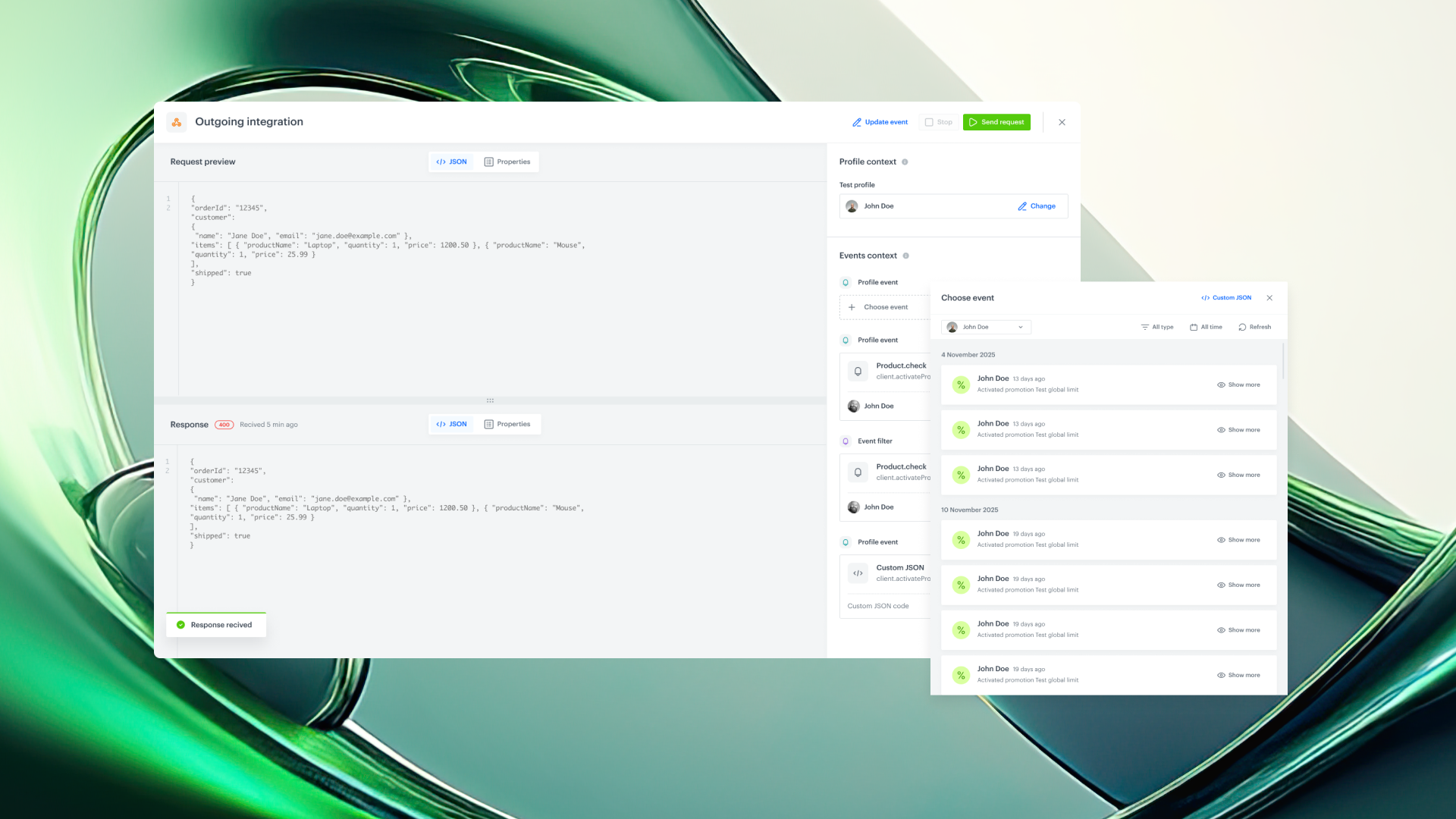
When configuring an outgoing integration, you’ll now see the option to Send test request.

This opens a dedicated test builder that allows you to supply the integration with the full data context required to execute the test, such as:

  • selection of the profile context (only Test Profiles allowed)
  • selection of an event context
  • rendering of dynamic values - used in the request (based on the event context)
  • preview of the outgoing request and response
  • immediate saving of the response as an event in Assets

No need to manually trigger workflows or send real events just to validate filters or logic.

How It Works

  1. Select Test Profile

Test profiles are used to supply the test with profile data context.

Therefore, if your integration contains references to customer data, Test Profiles allow it to populate with profile data.

Filling in this field is required if there is a dynamic variable in the request body that refers to a customer attribute.

  1. Choose Event Context

Select the event that matches your workflow trigger, “f there is a reference to the context of the event.

You can:

  • Filter events
  • Verify references and parameters
  • Ensure all required fields exist
  • Manually edit the event as JSON

If no event exists, you can define your own event directly in the preview.

  1. Render & Send

Preview request and response right away.

  1. Save Response as Event

After the test save the response directly as an event in Assets.

This eliminates the need to trigger a full automation just to create and test response-based events or filters.

Easy to use – no deep technical setup requiredAn intuitive, user-friendly UI guides you step by step, so anyone can test integrations quickly without involving the development team.

Use Cases

We’ve expanded our use case catalog with new, real-world scenarios! 🚀 Built on insights from our customers and powered by the latest features in our platform, these use cases are designed to help you unlock even more value.
Automation

Testing outgoing integrations

Validate configuration, connection and your request body - before you go live. We’re introducing a powerful new capability in Automation: the option to send a test request in outgoing integrations - both for predefined integrations and custom HTTP-based outgoing integrations.

You can now fully verify your setup - from connection and configuration to dynamic variables rendered from event context - without launching a workflow.  

What’s New

Send Test Request — directly from the outgoing integration configuration

When configuring an outgoing integration, you’ll now see the option to Send test request.

This opens a dedicated test builder that allows you to supply the integration with the full data context required to execute the test, such as:

  • selection of the profile context (only Test Profiles allowed)
  • selection of an event context
  • rendering of dynamic values - used in the request (based on the event context)
  • preview of the outgoing request and response
  • immediate saving of the response as an event in Assets

No need to manually trigger workflows or send real events just to validate filters or logic.

How It Works

  1. Select Test Profile

Test profiles are used to supply the test with profile data context.

Therefore, if your integration contains references to customer data, Test Profiles allow it to populate with profile data.

Filling in this field is required if there is a dynamic variable in the request body that refers to a customer attribute.

  1. Choose Event Context

Select the event that matches your workflow trigger, “f there is a reference to the context of the event.

You can:

  • Filter events
  • Verify references and parameters
  • Ensure all required fields exist
  • Manually edit the event as JSON

If no event exists, you can define your own event directly in the preview.

  1. Render & Send

Preview request and response right away.

  1. Save Response as Event

After the test save the response directly as an event in Assets.

This eliminates the need to trigger a full automation just to create and test response-based events or filters.

Easy to use – no deep technical setup requiredAn intuitive, user-friendly UI guides you step by step, so anyone can test integrations quickly without involving the development team.

Product Newsletter
Stay up to date with the latest Synerise product updates, new features, and practical insights — delivered straight to your inbox. Just subscribe to our weekly communication!
Read about our privacy policy.
Thank you! Your submission has been received!
Oops! Something went wrong while submitting the form.

Key benefits

Explore the core advantages of this feature and discover the value it brings to your daily work with Synerise.

Faster integration setup

No more sending real events to yourself just to test dynamic parameters.

Full visibility

Know exactly which integrations exist, who uses them, and how. It gives you the knowledge of which integrations exist, who uses them, and how.

Smarter workflow design

Save the response event instantly and use it in filters without running production traffic.

Safe testing environment

Test Profiles ensure content-only rendering and controlled execution.

Easy to use – no deep technical setup required

An intuitive, user-friendly UI guides you step by step, so anyone can test integrations quickly without involving the development team.

Use Cases

Explore real-life use cases that demonstrate how to apply this feature in practice through inspiring, ready-to-use scenarios that solve real challenges.
No items found.

Share your feedback with us!

Want to share your thoughts or have any questions about this article?
Leave us a message — we’d love to hear your opinion!
Synerise is the controller of your personal data processed for the purpose of fulfilling your request specified in this form. You may withdraw your consent at any time by contacting us. For more information on how we process your personal data and what rights you have, see our privacy policy.
Thank you! Your submission has been received!
Oops! Something went wrong while submitting the form.