Pricing

Snippet Playground

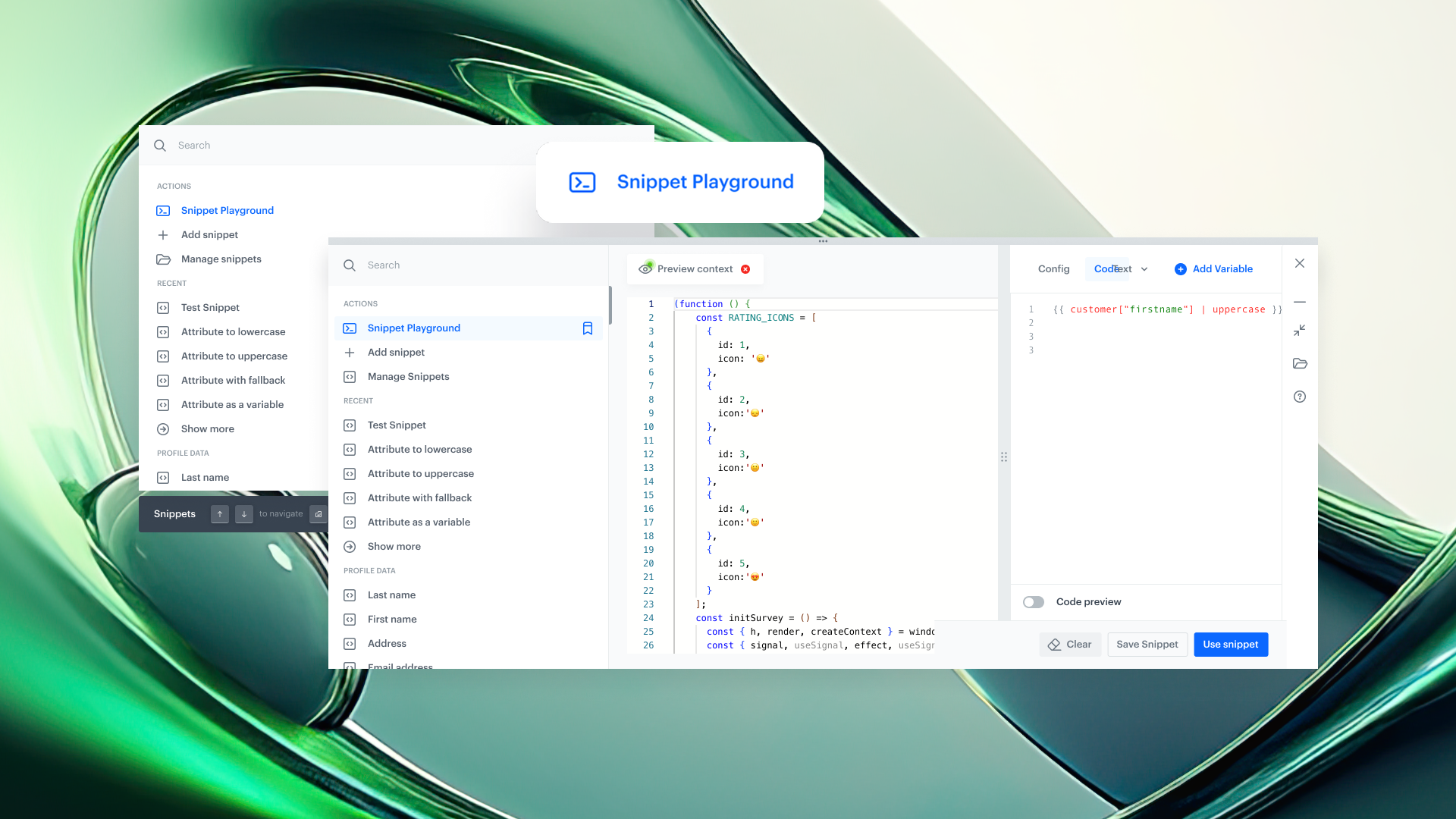
We’re introducing Snippet Playground — a dedicated workspace for testing and previewing content elements without opening a communication editor, modifying a full campaign template, or triggering an entire workflow. It provides a working draft of your content that’s always within reach, accessible from anywhere in the platform via a keyboard shortcut.

What’s New

Snippet Playground is powered by the Snippet Widget, making the two a powerful duo for editing, testing, and previewing content alongside the modules you’re currently working on. You can experiment freely without entering a campaign editor or running a full workflow.

The Playground can be opened from anywhere in Synerise using a keyboard shortcut: Cmd + / or Ctrl + /, ensuring it’s always available regardless of the module you’re in. It serves as a temporary draft space where you can independently experiment, preview results, and apply selected changes when you’re ready — all without leaving your current context.

You can:

  • Use Snippet Playground as a workspace to craft and preview content and Jinjava logic while working in other platform modules at the same time
  • Insert custom snippets into the Playground with a single action
  • Preview snippets for any user profile and adjust content or logic in real time
  • Navigate across the platform without losing your work — the Playground content remains available until you clear it manually
  • Save your work as a new snippet for reuse in future campaigns or automations
  • Edit existing snippets directly from the widget (edit mode), without going to the Snippets module

Key Capabilities

  • Flexible workspace across the platform
    Snippet Widget and Snippet Playground together provide a flexible, always-available workspace for crafting content and Jinjava logic while working in other Synerise modules. They function as a practical scratchpad for testing ideas, validating logic, and refining content without interrupting your current task.
  • Real-time editing & preview
    Update code and see changes rendered instantly across different user profiles - no extra steps, no delays.
  • Persistent drafts across platform
    Your work stays intact even if you navigate away. Drafts remain available until you clear them manually.
  • Platform-wide universal access via shortcut
    Call up Snippet Widget from anywhere in Synerise with Cmd + / or CTRL + / and edit without breaking your flow.

Snippet Playground extends the Snippet Widget into a platform-wide workspace for creating, testing, and refining content and Jinjava logic. It acts as a persistent scratchpad that supports experimentation and validation while working across different areas of the platform.

Use Cases

- Testing Jinjava in automation workflows


When working in automation workflows, use Snippet Playground to preview how Jinjava renders inside a webhook, event, or any other block. This allows you to validate the output for a specific user without running the entire workflow.

- Validating dynamic elements in communication

In email or other communication types, use the Playground to test and preview individual dynamic elements—such as aggregates, recommendations, or conditional logic—without previewing the full template. This helps you understand exactly what data will be returned for a given user.

- Quick checks in recommendation campaigns


While configuring a recommendation campaign, use the Playground to verify what recommendations are returned for a specific user, including the impact of filters or additional Jinjava logic, without deploying or fully testing the campaign.

- Verifying aggregates and expressions


When creating aggregates or expressions, use Snippet Playground to quickly check the output for a selected user, including any additional Jinjava logic applied on top of the analytical result.

Use Cases

We’ve expanded our use case catalog with new, real-world scenarios! 🚀 Built on insights from our customers and powered by the latest features in our platform, these use cases are designed to help you unlock even more value.
Campaigns

Snippet Playground

We’re introducing Snippet Playground — a dedicated workspace for testing and previewing content elements without opening a communication editor, modifying a full campaign template, or triggering an entire workflow. It provides a working draft of your content that’s always within reach, accessible from anywhere in the platform via a keyboard shortcut.

What’s New

Snippet Playground is powered by the Snippet Widget, making the two a powerful duo for editing, testing, and previewing content alongside the modules you’re currently working on. You can experiment freely without entering a campaign editor or running a full workflow.

The Playground can be opened from anywhere in Synerise using a keyboard shortcut: Cmd + / or Ctrl + /, ensuring it’s always available regardless of the module you’re in. It serves as a temporary draft space where you can independently experiment, preview results, and apply selected changes when you’re ready — all without leaving your current context.

You can:

  • Use Snippet Playground as a workspace to craft and preview content and Jinjava logic while working in other platform modules at the same time
  • Insert custom snippets into the Playground with a single action
  • Preview snippets for any user profile and adjust content or logic in real time
  • Navigate across the platform without losing your work — the Playground content remains available until you clear it manually
  • Save your work as a new snippet for reuse in future campaigns or automations
  • Edit existing snippets directly from the widget (edit mode), without going to the Snippets module

Key Capabilities

  • Flexible workspace across the platform
    Snippet Widget and Snippet Playground together provide a flexible, always-available workspace for crafting content and Jinjava logic while working in other Synerise modules. They function as a practical scratchpad for testing ideas, validating logic, and refining content without interrupting your current task.
  • Real-time editing & preview
    Update code and see changes rendered instantly across different user profiles - no extra steps, no delays.
  • Persistent drafts across platform
    Your work stays intact even if you navigate away. Drafts remain available until you clear them manually.
  • Platform-wide universal access via shortcut
    Call up Snippet Widget from anywhere in Synerise with Cmd + / or CTRL + / and edit without breaking your flow.

Snippet Playground extends the Snippet Widget into a platform-wide workspace for creating, testing, and refining content and Jinjava logic. It acts as a persistent scratchpad that supports experimentation and validation while working across different areas of the platform.

Use Cases

- Testing Jinjava in automation workflows


When working in automation workflows, use Snippet Playground to preview how Jinjava renders inside a webhook, event, or any other block. This allows you to validate the output for a specific user without running the entire workflow.

- Validating dynamic elements in communication

In email or other communication types, use the Playground to test and preview individual dynamic elements—such as aggregates, recommendations, or conditional logic—without previewing the full template. This helps you understand exactly what data will be returned for a given user.

- Quick checks in recommendation campaigns


While configuring a recommendation campaign, use the Playground to verify what recommendations are returned for a specific user, including the impact of filters or additional Jinjava logic, without deploying or fully testing the campaign.

- Verifying aggregates and expressions


When creating aggregates or expressions, use Snippet Playground to quickly check the output for a selected user, including any additional Jinjava logic applied on top of the analytical result.

Product Newsletter
Stay up to date with the latest Synerise product updates, new features, and practical insights — delivered straight to your inbox. Just subscribe to our weekly communication!
Read about our privacy policy.
Thank you! Your submission has been received!
Oops! Something went wrong while submitting the form.

Key benefits

Explore the core advantages of this feature and discover the value it brings to your daily work with Synerise.

Edit anywhere, anytime

Invoke the widget and playground from any view with a simple shortcut.

Faster personalization testing

Preview content for any profile without leaving the workflow.

Persistent workspace

Keep drafts until you decide to clear them—no accidental loss.

Edit existing snippets

Open and modify existing snippets in edit mode directly from the widget, without switching to the Snippets module.

Reuse your work

Save Playground content as a snippet for future use in campaigns or automations.

Use Cases

Explore real-life use cases that demonstrate how to apply this feature in practice through inspiring, ready-to-use scenarios that solve real challenges.
No items found.

Share your feedback with us!

Want to share your thoughts or have any questions about this article?
Leave us a message — we’d love to hear your opinion!
Synerise is the controller of your personal data processed for the purpose of fulfilling your request specified in this form. You may withdraw your consent at any time by contacting us. For more information on how we process your personal data and what rights you have, see our privacy policy.
Thank you! Your submission has been received!
Oops! Something went wrong while submitting the form.