Pricing

Redesigned Workflow Statistics

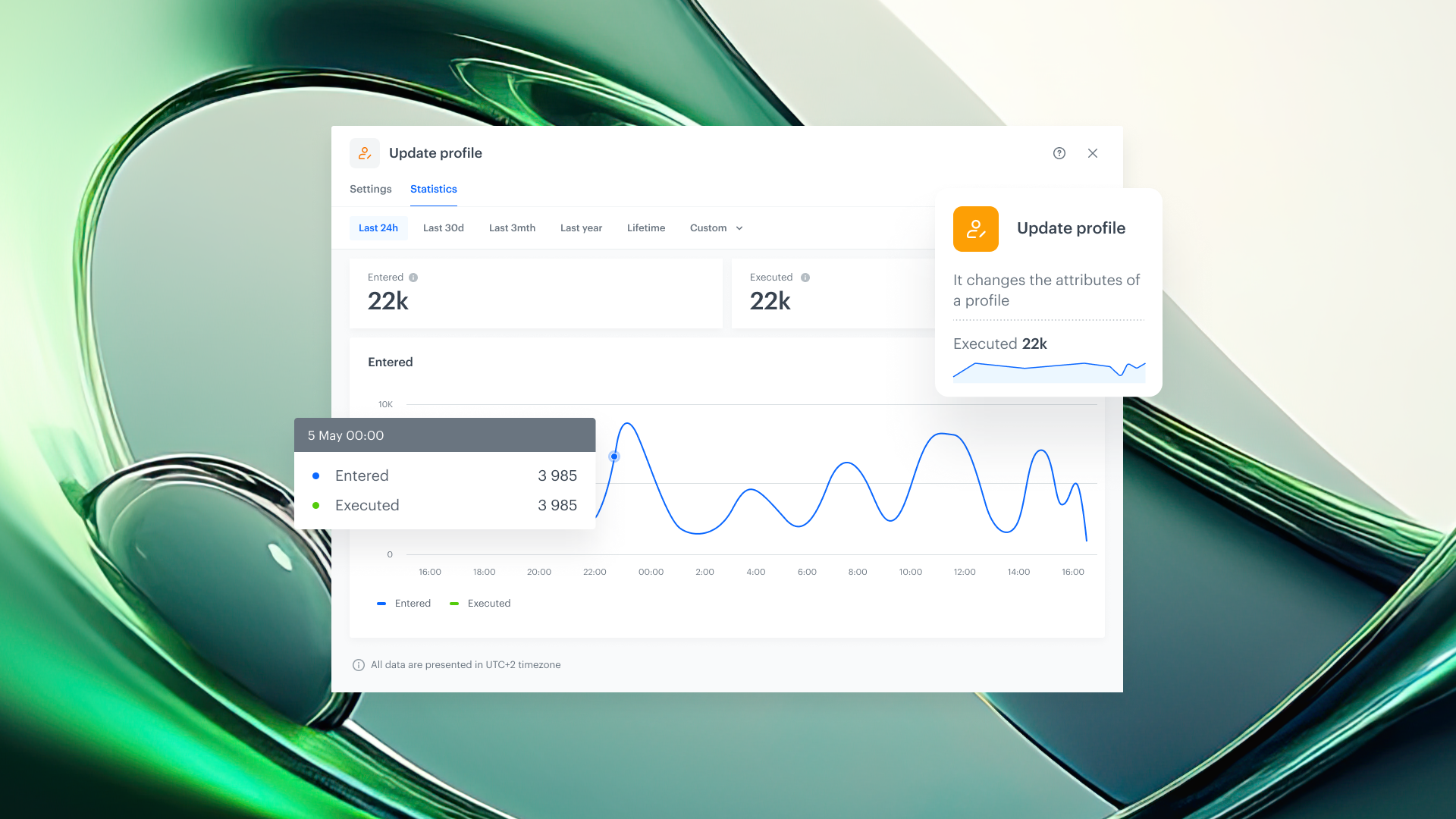
A completely redesigned statistics experience for Automation workflows, giving you real-time visibility into every node, right on the canvas.

Understanding how your automations perform should be effortless, and the statistics experience should match the power of the workflows you build. With the latest Automation release, we've completely redesigned workflow statistics from the ground up, delivering a richer, more intuitive experience that keeps performance data front and center on the canvas. New visualization options, flexible time ranges, and deeper per-node insights make it easier than ever to monitor, validate, and optimize every step of your workflow in real time.

What's New

We've completely rebuilt the statistics experience inside Automation with a set of capabilities designed to keep you informed without breaking your flow.

  • Adjustable time range on the canvas
    You can now change the time range of statistics displayed directly on each node, whether you need a snapshot of the last hour or a trend over the last 7 days. No more navigating away; the data adapts to your question.
  • Node Heartbeat 
    Every node now features a heartbeat: a simplified inline chart that gives you an at-a-glance overview of executions over time. Think of it as a vital sign for each step of your workflow: one quick look tells you whether things are running smoothly or something needs attention.
  • Dedicated statistics in node details 
    Opening any node's details now reveals a dedicated statistics section with deeper performance data, so you can drill into execution counts, trends, and patterns without leaving the editor.
  • Campaign statistics for sending nodes
    Sending nodes such as email, SMS, or push now include a dedicated campaign statistics section. Track delivery, engagement, and performance metrics for every communication step, all in context.
  • Statistics on a timeline 
    All statistics are now presented on an interactive timeline, making it easy to identify spikes, drops, or anomalies across any period. Visualize execution patterns and correlate them with campaign events or external factors.

Why It Matters

1. Faster decision-making
When performance data lives directly on the canvas, you don't need to hop between tools or wait for reports. You see the current state of your workflow the moment you open it, and you can act immediately.

2. Proactive monitoring
The heartbeat and timeline views make it easy to catch irregularities before they become problems. Spot a sudden drop in executions, investigate a spike in send failures, or validate that a newly deployed workflow is performing as expected, all in real time.

3. Built to grow
The new statistics architecture isn't just a visual refresh, it's a foundation. Expect new metrics, deeper drill-downs, and expanded monitoring capabilities in future releases, all built on this solid base.

Use Cases

We’ve expanded our use case catalog with new, real-world scenarios! 🚀 Built on insights from our customers and powered by the latest features in our platform, these use cases are designed to help you unlock even more value.
Automation

Redesigned Workflow Statistics

A completely redesigned statistics experience for Automation workflows, giving you real-time visibility into every node, right on the canvas.

Understanding how your automations perform should be effortless, and the statistics experience should match the power of the workflows you build. With the latest Automation release, we've completely redesigned workflow statistics from the ground up, delivering a richer, more intuitive experience that keeps performance data front and center on the canvas. New visualization options, flexible time ranges, and deeper per-node insights make it easier than ever to monitor, validate, and optimize every step of your workflow in real time.

What's New

We've completely rebuilt the statistics experience inside Automation with a set of capabilities designed to keep you informed without breaking your flow.

  • Adjustable time range on the canvas
    You can now change the time range of statistics displayed directly on each node, whether you need a snapshot of the last hour or a trend over the last 7 days. No more navigating away; the data adapts to your question.
  • Node Heartbeat 
    Every node now features a heartbeat: a simplified inline chart that gives you an at-a-glance overview of executions over time. Think of it as a vital sign for each step of your workflow: one quick look tells you whether things are running smoothly or something needs attention.
  • Dedicated statistics in node details 
    Opening any node's details now reveals a dedicated statistics section with deeper performance data, so you can drill into execution counts, trends, and patterns without leaving the editor.
  • Campaign statistics for sending nodes
    Sending nodes such as email, SMS, or push now include a dedicated campaign statistics section. Track delivery, engagement, and performance metrics for every communication step, all in context.
  • Statistics on a timeline 
    All statistics are now presented on an interactive timeline, making it easy to identify spikes, drops, or anomalies across any period. Visualize execution patterns and correlate them with campaign events or external factors.

Why It Matters

1. Faster decision-making
When performance data lives directly on the canvas, you don't need to hop between tools or wait for reports. You see the current state of your workflow the moment you open it, and you can act immediately.

2. Proactive monitoring
The heartbeat and timeline views make it easy to catch irregularities before they become problems. Spot a sudden drop in executions, investigate a spike in send failures, or validate that a newly deployed workflow is performing as expected, all in real time.

3. Built to grow
The new statistics architecture isn't just a visual refresh, it's a foundation. Expect new metrics, deeper drill-downs, and expanded monitoring capabilities in future releases, all built on this solid base.

Product Newsletter
Stay up to date with the latest Synerise product updates, new features, and practical insights — delivered straight to your inbox. Just subscribe to our weekly communication!
Read about our privacy policy.
Thank you! Your submission has been received!
Oops! Something went wrong while submitting the form.

Key benefits

Explore the core advantages of this feature and discover the value it brings to your daily work with Synerise.

Real-time visibility on the canvas

Monitor node executions, campaign delivery, and performance trends without leaving the workflow editor.

Flexible time ranges

Adjust the statistics window on any node to match the question you're asking, whether it's last hour, last day, or last month.

Instant Activation

Use Databricks insights instantly in campaigns and automation

Campaign-level insights in context 

Dedicated campaign statistics on sending nodes let you evaluate communication performance right where the action happens.

Future-ready architecture

A refreshed UI built as a foundation for richer metrics and deeper monitoring capabilities in upcoming releases.

Use Cases

Explore real-life use cases that demonstrate how to apply this feature in practice through inspiring, ready-to-use scenarios that solve real challenges.
No items found.

Share your feedback with us!

Want to share your thoughts or have any questions about this article?
Leave us a message — we’d love to hear your opinion!
Synerise is the controller of your personal data processed for the purpose of fulfilling your request specified in this form. You may withdraw your consent at any time by contacting us. For more information on how we process your personal data and what rights you have, see our privacy policy.
Thank you! Your submission has been received!
Oops! Something went wrong while submitting the form.