Pricing

Snippets Widget in Automation

Standardize your automation flows with reusable snippets — text, vouchers, recommendations — now just a click away inside every action block. The Snippet widget knows exactly where dynamic content fits and keeps it all in sync, so your messages stay consistent without the manual hassle.

Build once. Reuse everywhere.
Snippets now expand into Synerise Automation, becoming your single source of truth for reusable, standardized content across all channels.

What’s new

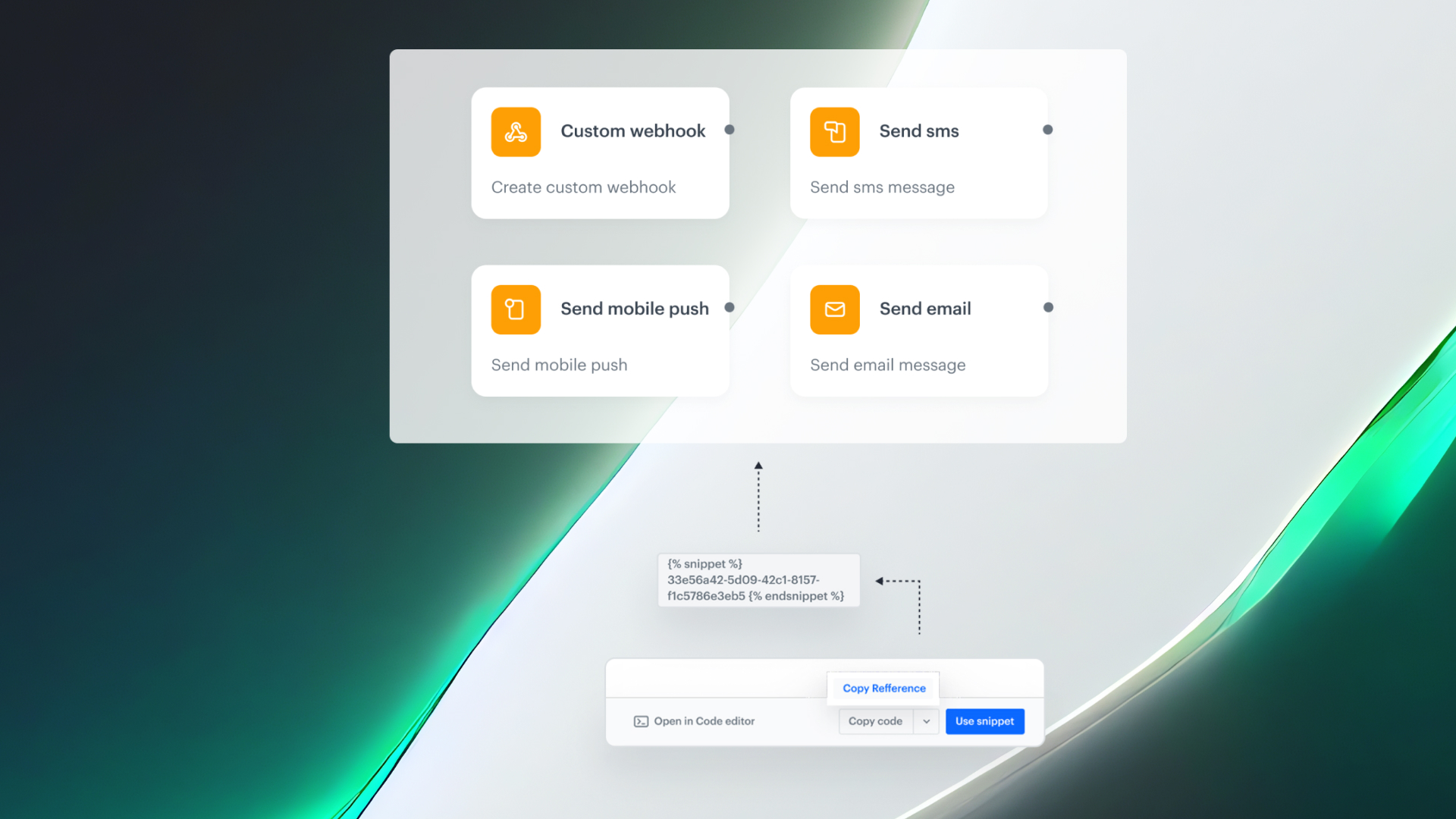
Creating consistent, dynamic messages in automation just got easier. With the new Snippet widget, you can insert any predefined snippet - text, vouchers, recommendations - directly into emails, SMS, push, or webhook nodes. No copy-pasting. No manual syncing. Just content that stays aligned, everywhere it’s used.  

Wherever dynamic content is supported, you’ll now see a snippet icon. Clicking it opens a library where you can browse existing snippets or create new ones, without breaking your flow.

The widget automatically recognizes and tracks every compatible field across all nodes in your diagram, so you'll always know where dynamic values can be used.

Why This Matters

This enhancement speeds up the entire automation process. Instead of recreating message content from scratch, teams can now insert approved, reusable content blocks in seconds. It also solves a long-standing challenge - figuring out where Jinjava-based dynamic references are allowed. With clearly marked fields and the snippet icon as your guide, you’ll always know exactly where and how dynamic content can be applied.

How It Works

  1. Select any action block in Workflow builder (Email, SMS, Web Push, Webhook, etc.).
  1. Fields that accept dynamic values now display the snippet icon.
  1. Click the icon to launch the Snippet widget: search, add, or manage snippets.
  1. Preview content and metadata (find more on Predefined Snippet Details & Direct Object Access).
  1. Insert the snippet.
  1. Publish the workflow. Any future edit to the snippet propagates to every live automation that references it – no redeploys required. If the snippet is included as a reference, all updates are automatically reflected without needing to republish each workflow individually.

Use Cases

We’ve expanded our use case catalog with new, real-world scenarios! 🚀 Built on insights from our customers and powered by the latest features in our platform, these use cases are designed to help you unlock even more value.
Automation

Snippets Widget in Automation

Standardize your automation flows with reusable snippets — text, vouchers, recommendations — now just a click away inside every action block. The Snippet widget knows exactly where dynamic content fits and keeps it all in sync, so your messages stay consistent without the manual hassle.

Build once. Reuse everywhere.
Snippets now expand into Synerise Automation, becoming your single source of truth for reusable, standardized content across all channels.

What’s new

Creating consistent, dynamic messages in automation just got easier. With the new Snippet widget, you can insert any predefined snippet - text, vouchers, recommendations - directly into emails, SMS, push, or webhook nodes. No copy-pasting. No manual syncing. Just content that stays aligned, everywhere it’s used.  

Wherever dynamic content is supported, you’ll now see a snippet icon. Clicking it opens a library where you can browse existing snippets or create new ones, without breaking your flow.

The widget automatically recognizes and tracks every compatible field across all nodes in your diagram, so you'll always know where dynamic values can be used.

Why This Matters

This enhancement speeds up the entire automation process. Instead of recreating message content from scratch, teams can now insert approved, reusable content blocks in seconds. It also solves a long-standing challenge - figuring out where Jinjava-based dynamic references are allowed. With clearly marked fields and the snippet icon as your guide, you’ll always know exactly where and how dynamic content can be applied.

How It Works

  1. Select any action block in Workflow builder (Email, SMS, Web Push, Webhook, etc.).
  1. Fields that accept dynamic values now display the snippet icon.
  1. Click the icon to launch the Snippet widget: search, add, or manage snippets.
  1. Preview content and metadata (find more on Predefined Snippet Details & Direct Object Access).
  1. Insert the snippet.
  1. Publish the workflow. Any future edit to the snippet propagates to every live automation that references it – no redeploys required. If the snippet is included as a reference, all updates are automatically reflected without needing to republish each workflow individually.

Boletín sobre productos
Mantente al día de las últimas actualizaciones de los productos de Synerise, las nuevas funciones y la información práctica, directamente en tu bandeja de entrada. ¡Solo tienes que suscribirte a nuestro boletín semanal!
Thank you! Your submission has been received!
Oops! Something went wrong while submitting the form.

Ventajas principales

Explora las ventajas principales de esta función y descubre el valor que aporta a tu trabajo diario con Synerise.

Flujos de trabajo inteligentes

Ya no tendrás que recrear la misma lógica de mensajes en cada viaje

Ejecución más rápida

Añade snippets y publícalos al instante

Guía integrada

El icono de snippet muestra dónde se admite el contenido dinámico

Use Cases

Explore real-life use cases that demonstrate how to apply this feature in practice through inspiring, ready-to-use scenarios that solve real challenges.
No items found.

Comparte tu opinión con nosotros

¿Quieres compartir tus opiniones o tienes alguna pregunta sobre este artículo?
Déjanos un mensaje, ¡nos encantaría conocer tus sugerencias!
Synerise es el responsable del tratamiento de tus datos personales con el fin de satisfacer tu solicitud especificada en este formulario. Puedes retirar tu consentimiento en cualquier momento poniéndote en contacto con nosotros. Para obtener más información sobre cómo tratamos tus datos personales y cuáles son tus derechos, consulta nuestra política de privacidad.
Thank you! Your submission has been received!
Oops! Something went wrong while submitting the form.